
Searching Yell County Civil Dockets
The official starting point is the Search ARCourts case search. You can look up a person by first, middle, and last name. Businesses go in the Organization or Case Description field. If you already have a court number, the Case ID search fits best. Depending on the court, the portal may show parties, the judge, filings, and future events. Judgments and some linked public records may appear as well.
Before you rely on a match, confirm it is really a Yell County case in the right civil subject. Two people can share a name. Check the filing context, party roles, assigned judge, and court. Keep the case number exactly as printed, since Yell County uses no special local format. For an older file, a District Court matter, or an unlinked pleading, go to the clerk. Do not assume nothing exists.
- Choose participant or Case ID search in Search ARCourts.
- Enter verified party details or the court-issued identifier.
- Match Yell County, court level, case type, and venue.
- Read filings, service entries, motions, settings, orders, and judgment in date order.
- Ask the proper clerk for an unavailable or certified document.
Yell Civil Dockets Across Seats
Yell County runs courthouses in both Danville and Dardanelle. A result labeled only “Yell County” may not reveal which building holds the civil file. The 2026 Fifteenth Circuit administrative plan assigns work by subject, division, and courthouse. Start there. Then match the judge and venue in the case record. Confirm the location with the Circuit and County Clerk before you drive over.
The Danville clerk counter sits at 101 E. 5th Street, phone 479-495-4850. In Dardanelle, the counter is at 106 Union Street, phone 479-229-4404. Mail for the Circuit Clerk goes to P.O. Box 219, Danville, AR 72833. Ask which seat holds the pleading or judgment. Also ask whether you can inspect it, get it by mail or email, or order a clerk-made copy.
Venue check: “Yell County” identifies the county, not necessarily the correct courthouse counter. Call with the case number before visiting.
Inside a Yell County Civil Docket
A civil docket is the timeline of the case. Many matters open with a filed complaint or petition. Summons and service entries record attempts to notify the other side. After that come answers, motions, notices, orders, settings, and judgment. An index label is a clue, nothing more. It does not reproduce the filing, and it does not vouch that every statement inside a pleading is true.
| Case ID | The court’s identifier. A neutral display example is YELL-CIVIL-CASE-ID. |
|---|---|
| Parties | Publicly displayed names and roles in the action. |
| Filing | The date and description of an indexed complaint, petition, answer, notice, or other item. |
| Motion | A request for court action, often followed by a response or order. |
| Future Event | An advertised Search ARCourts category for a coming setting. |
| Judgment | The recorded adjudication or relief, subject to public-access limits. |
Some public records have linked documents, but many filings do not. When the exact wording matters, ask the clerk for the filed paper by its title and date.
Yell Civil Filing Through eFlex
Arkansas eFlex is built for filers and electronic service. It is not for browsing a Yell County civil docket. To register, an eligible user must first complete training. Expect costs: a $100 registration fee, plus a $20 new-case electronic filing fee on top of the statutory filing fees. The system takes electronic check, Visa, MasterCard, and Discover.
For the current enrollment path, follow the official e-filing enrollment instructions published by the state courts. They walk through each step of joining that filing channel.
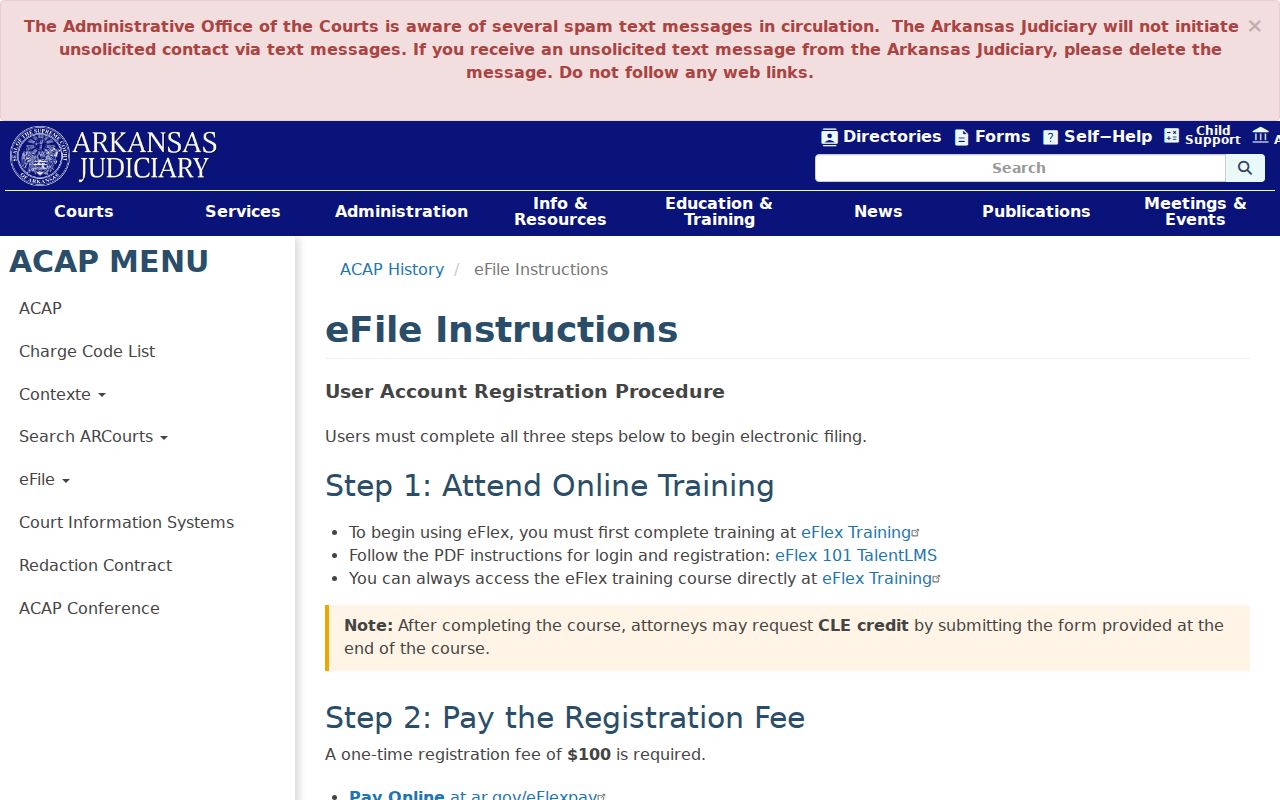
Filing through eFlex and public display in Search ARCourts are separate functions. A filing can be indexed in the docket even when its document image stays out of a remote reader's reach.
Civil Case Types on the Docket
Yell County Circuit Court is a unified general-jurisdiction court. Yet its civil records still sort by subject. General civil covers contracts, torts, property, and other requests for relief. Domestic-relations and probate cases sit in their own divisions. District Court keeps limited civil and small-claims jurisdiction. Under the administrative plan, state district judges may also act on referred Circuit matters. Those include some uncontested or consent proceedings.
- General civil disputes, including contract, tort, and property claims
- Domestic-relations matters assigned under the Circuit plan
- Probate cases involving estates or protected persons
- Limited civil and small-claims matters in District Court
- District Court appeals and authorized referred Circuit work
One event before a district judge does not turn a Circuit Court civil case into a District Court file. Check the court label and case number. If the classification still looks murky, ask the maintaining clerk.
Yell Civil Filing Sequence
A common civil chronology is Complaint or Petition › Summons and Service › Answer › Motions › Setting › Order or Judgment › Post-Judgment Activity or Appeal. Each step may create several entries. A return of service records a delivery attempt or result. A motion asks the court to act. An order records the judge’s direction. Judgment states adjudicated relief or an outcome.
- Service
- The record of an effort to deliver required case papers.
- Answer
- A responding pleading filed by a party.
- Motion
- A request asking the court to take a defined action.
- Default judgment
- A judgment entered under applicable procedure when a required response is absent, not a mere search status.
- Post-judgment
- Activity after judgment, which may include enforcement or appeal steps.
Do not stop at the first judgment label. Later orders can shape enforcement, and a notice of appeal opens a separate review path.
Civil Docket Settings and Hearings
Search ARCourts lists “Future Events.” A notice of hearing or scheduling order may add detail. The court publishes no stand-alone daily Yell civil calendar. So confirm a setting through the case record, the latest filed order, the Circuit Clerk, and the judge's office. Courthouse postings or a terminal may help too, though that access is not guaranteed.
A reset just means the prior setting moved, not that the claim ended. A continuance is a court-authorized postponement. Even a portal event can be overtaken by a newer order, a holiday change, bad weather, or a special setting. When you call, give the case number, venue, party role, and event shown. Ask for the date, local time, courtroom or remote instructions, event type, appearance requirement on the official record, and any newer order. The Yell County Court Dates page walks through broader confirmation steps.
Yell eFlex Payment Change
One eFlex practice changed on June 5, 2026. The Administrative Office of the Courts ended subscription-based payment in its payment policy, which still lists the other accepted methods. Treat it as a filing-system rule. It has nothing to do with what it costs to view a Yell County civil docket or order a clerk copy, and the policy page spells that out in full.
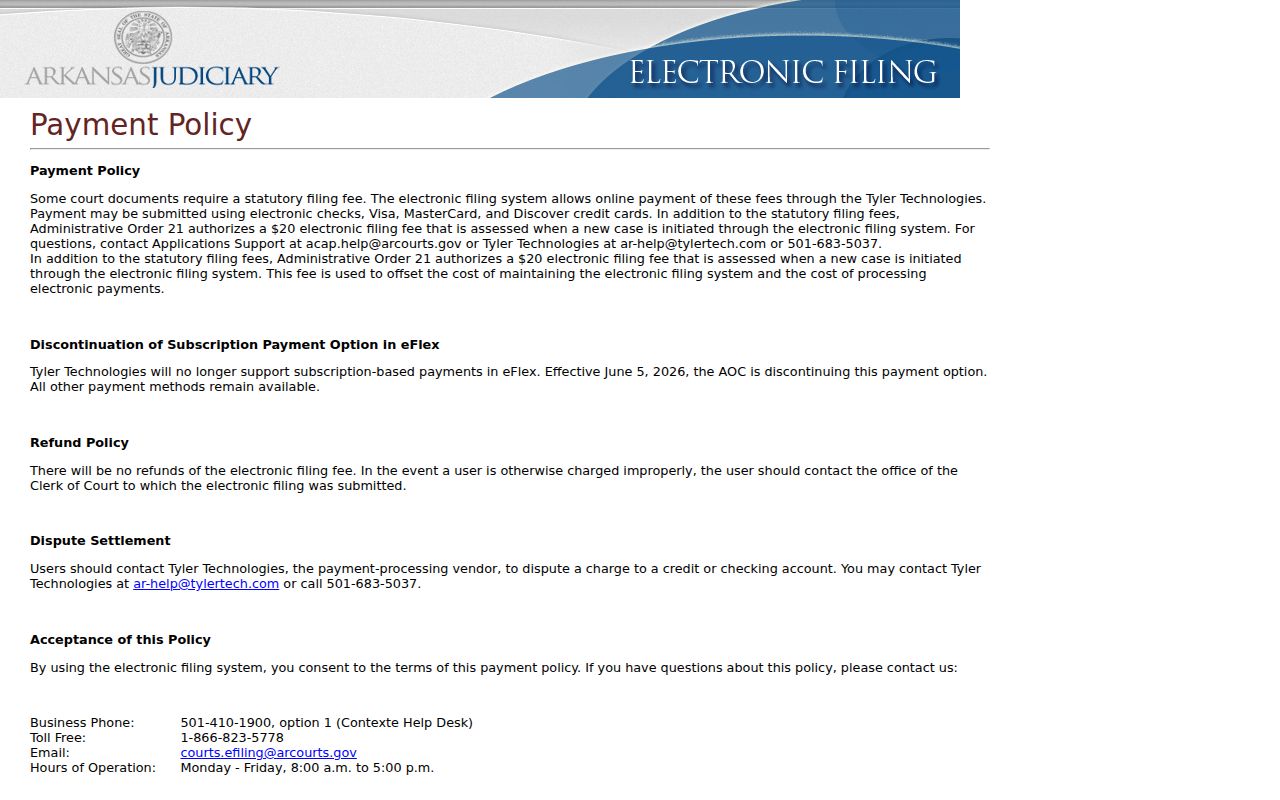
Electronic filing fees, case-initiation costs set by statute, and clerk copy charges are three separate things. Running a Search ARCourts query is free of any eFlex filing account.
Civil Docket Access Rules
Administrative Order 19 governs access to Arkansas judicial case records. It opens most records to the public. But it shields what federal law, Arkansas law, court rule, or court order protects. Social Security numbers, account numbers, protected addresses, sealed material, and judicial or staff deliberative notes stay out of public view. Redaction is one tool. It blacks out confidential facts but leaves a public version of the filing. Sealing goes further and closes the filing or case itself.
The Arkansas Rules of Civil Procedure add filer duties through Rule 5(c)(2). That rule requires careful handling of sensitive data in every civil filing.
This is why a Yell County filing you pull up may show blacked-out lines. It also explains why an unredacted copy can sit under seal. No email to the clerk can undo a sealing order; only the court can.
Missing Yell Civil Pleadings
Start by confirming the case and the filing entry itself. Write down the case number, the document description, and the filing date. Then go to the right office. The Circuit and County Clerk handles Circuit matters, or call the District Court clerk at 479-229-1389 for limited civil and small-claims records. Ask whether the item is paper, archived, or scanned. Also ask whether you can view it on a public terminal or order a plain or certified copy. Mail and email work too. The Circuit Clerk accepts mail at P.O. Box 219, Danville, AR 72833, and email at yellcountyclerk@arkansasclerks.com once you confirm the venue.
Never include account numbers, Social Security digits, or other protected identifiers. Say which copy type and delivery method you want. Get a price and turnaround estimate before committing. The county publishes no fee sheet for ordinary copies. It posts no certified-copy form, public-terminal guide, or exact counter hours. Confirm those details with the clerk. Do not assume a statewide price.
A tight Yell County civil record request names the court and seat, case number, case style, document title, filing date, copy type, delivery method, and a maximum cost you will approve. Ask whether prepayment is required. Administrative Order 19 and the clerk's own court-record process control what gets released. The Arkansas Freedom of Information Act yields to seals and confidentiality rules. The Supreme Court's control of judicial records also limits it. When confidential facts can be redacted, the rest of the filing may stay open. If the case or filing is sealed, only the court can lift that.